customPlus —— 自定义项目例程

光庆 20天前 640

库里面自带了例程,可自行查看代码测试。本文中的例程代码仅供参考。
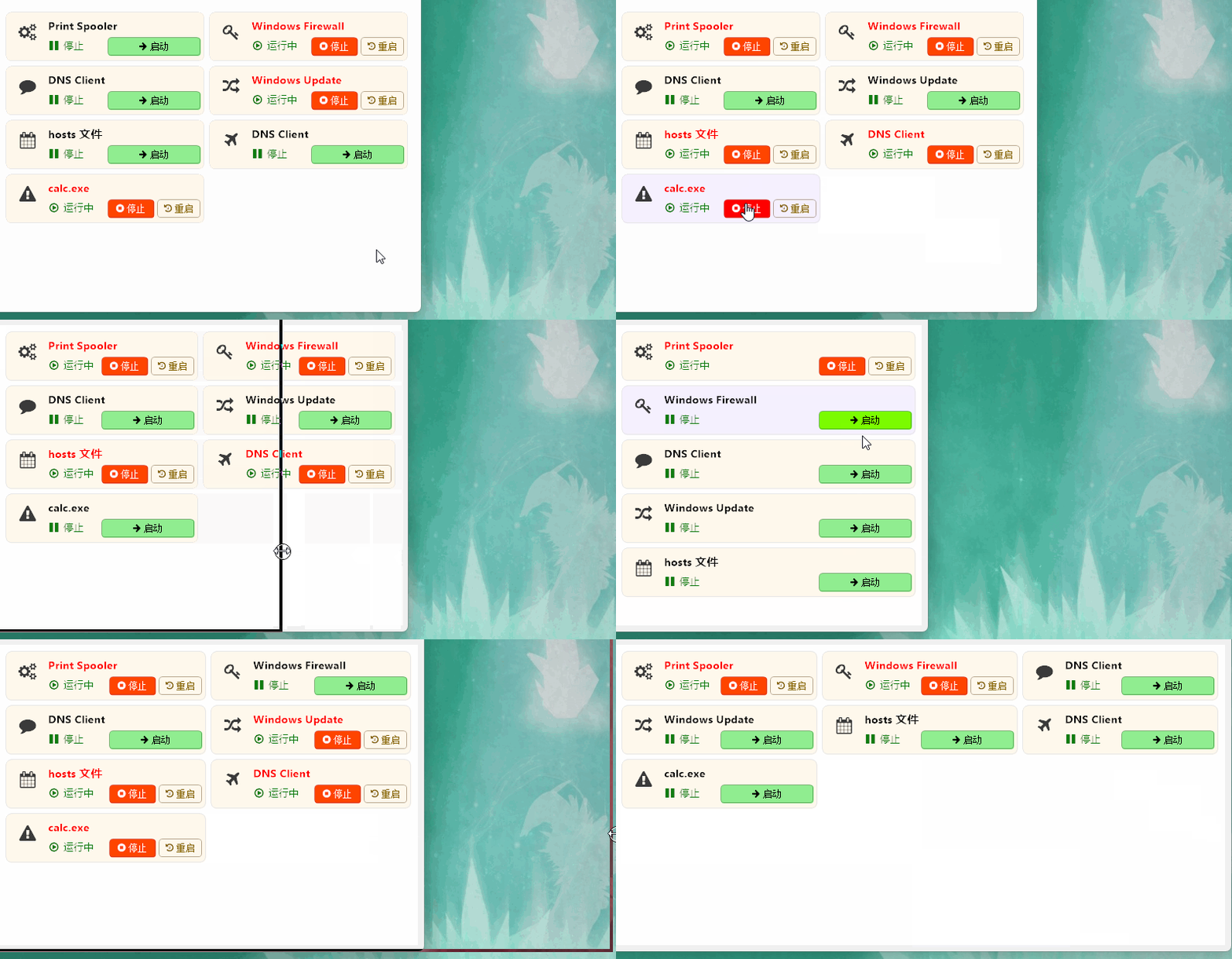
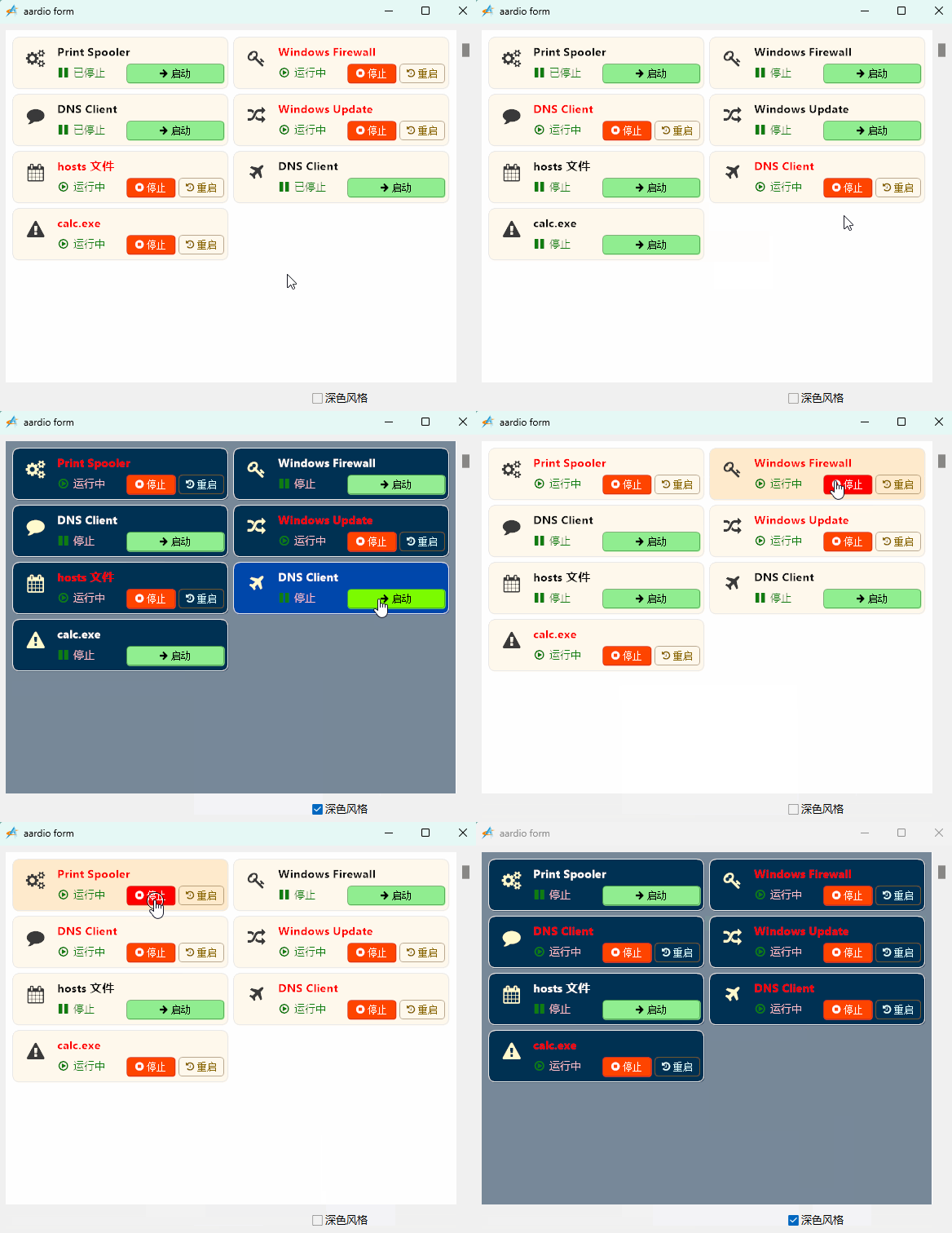
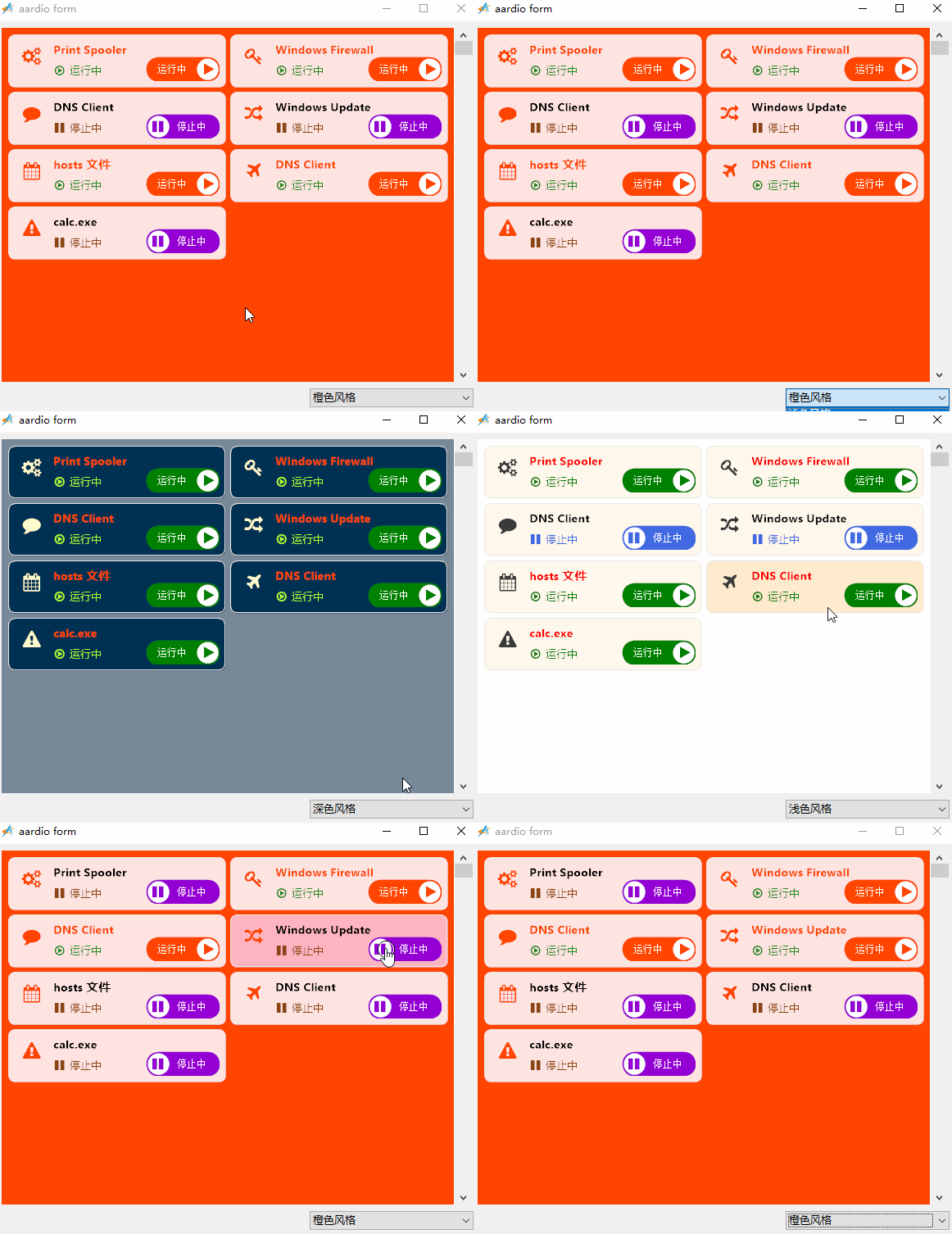
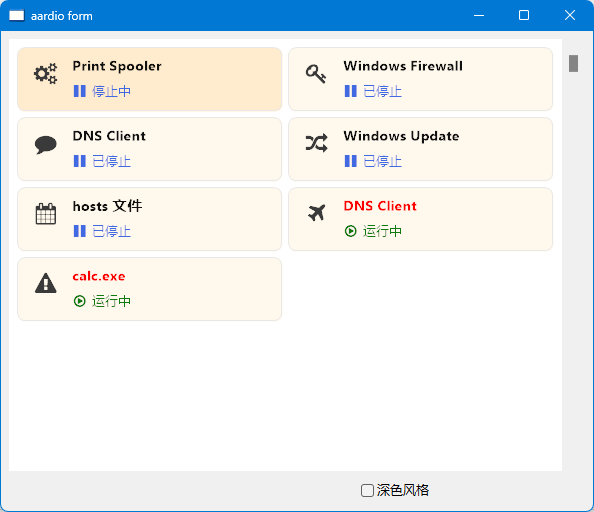
//项目风格——通过改变元素的hide属性实现多元素切换显示
import win.ui;
import fonts.fontAwesome
import godking.customPlus;
/*DSG{{*/
var winform = win.form(text="aardio form";right=591;bottom=479)
winform.add(
checkbox={cls="checkbox";text="深色风格";left=384;top=448;right=584;bottom=472;z=3};
plus={cls="plus";left=8;top=8;right=560;bottom=440;bgcolor=0xC0DCC0;db=1;dl=1;dr=1;dt=1;notify=1;z=1};
scrollbar={cls="scrollbar";left=560;top=8;right=584;bottom=440;db=1;dr=1;dt=1;edge=1;z=2}
)
/*}}*/

var itemModel = {
    // 1. 卡片背景(最底层)
    {
        type="rect";
        rectf={x=3; y=3; width=-3; height=-3}; 
        round=8;
        width=1;
        color=0xFFE8E8E8;
        fillcolor=0xFFFFF8EC;
        itemhoveredfillcolor=0xFFFFEBCD; 
    };
    // 2. 类型大图标(左侧 FontAwesome)
    {
        name="typeIcon";
        type="text";
        rectf={x=12; y=10; width=40; height=42};
        font={name='FontAwesome'; h=22; color=0xFF3A3A3A};
        align=1; 
        valign=1; 
        smooth=true;
        text='\uF085';
    };
    // 3. 服务名称
    {
        name="svcName";
        type="text";
        rectf={x=56; y=10; width=-8; height=24};
        font={name='Tahoma'; h=14; weight=600; color=0xFF111111};
        align=0; 
        valign=1; 
        smooth=true;
    };
    // 4. 状态图标(FontAwesome,底部左侧)
    {
        name="statusIcon";
        type="text";
        rectf={x=56; y=36; width=20; height=24};
        font={name='FontAwesome'; h=14; color=0xFF107C10};
        align=1; 
        valign=1; 
        smooth=true;
        text='\uF111';
    };
    // 5. 状态文字标签(底部)
    {
        name="statusLabel";
        type="text";
        rectf={x=76; y=36; width=-136; height=24};
        font={name='Tahoma'; h=12; color=0xFF107C10};
        align=0; 
        valign=1; 
    };
    // 6. 停止按钮背景
    {
        name="btnStopBg";
        type="rect";
        rectf={x=-128; y=36; width=-68; height=24};
        round=4; 
        //width=0;
        //color=0xAAC42B1A; 
        fillcolor=0xFFFF4500;
        hoveredfillcolor=0xFFFF0000;
        hover=true; 
        cursor=32649/*_IDC_HAND*/; 
        click=true;
    };
    // 7. 停止按钮文字
    {
        name="btnStopText";
        type="text";
        rectf={x=-128; y=36; width=-68; height=24};
        font={name='FontAwesome'; h=12; color=0xFFFFFFFF};
        align=1; 
        valign=1; 
        text='\uF28D 停止';
    };
    // 8. 重启按钮背景
    {
        name="btnRestartBg";
        type="rect";
        rectf={x=-64; y=36; width=-8; height=24};
        round=4; 
        //width=0;
        //color=0xAA876400; 
        fillcolor=0xFF4169E1;
        hoveredfillcolor=0xFF0047AB;
        hover=true; 
        cursor=32649; 
        click=true;
    };
    // 9. 重启按钮文字
    {
        name="btnRestartText";
        type="text";
        rectf={x=-64; y=36; width=-8; height=24};
        font={name='FontAwesome'; h=12; color=0xFFFFFFFF};
        align=1; 
        valign=1; 
        text='\uF1DA 重启';
    };
    // 10. 启动/操作按钮背景
    {
        name="btnStartBg";
        type="rect";
        rectf={x=-128; y=36; width=-8; height=24};
        round=4; 
        width=1;
        color=0xAA107C10; 
        fillcolor=0xFF90EE90;
        hoveredfillcolor=0xFF7CFC00;
        hover=true; 
        cursor=32649; 
        click=true;
    };
    // 11. 启动/操作按钮文字
    {
        name="btnStartText";
        type="text";
        rectf={x=-128; y=36; width=-8; height=24};
        font={name='FontAwesome'; h=12; color=0xFF000000};
        align=1; 
        valign=1;
        text='\uF061 启动';
    };
 };

var itemModel_dark = ..table.clone(itemModel);
itemModel_dark[1].fillcolor=0xFF003153;
itemModel_dark[1].itemhoveredfillcolor=0xFF0047AB; 	
itemModel_dark[2].font.color = 0xFFFFFACD;
itemModel_dark[3].font.color = 0xFFFFFFFF;
itemModel_dark[4].font.color = 0xFF107C10;
itemModel_dark[5].font.color = 0xFFFFC0CB;
itemModel_dark[9].font.color = 0xFFE0FFFF;

itemList = {
	{typeIcon='\uF085'; statusLabel=string.random("运行中","已停止"); svcName="Print Spooler";};
	{typeIcon='\uF084'; statusLabel=string.random("运行中","已停止"); svcName="Windows Firewall";};
	{typeIcon='\uF075'; statusLabel=string.random("运行中","已停止"); svcName="DNS Client";};
	{typeIcon='\uF074'; statusLabel=string.random("运行中","已停止"); svcName="Windows Update";};
	{typeIcon='\uF073'; statusLabel=string.random("运行中","已停止"); svcName="hosts 文件";};
	{typeIcon='\uF072'; statusLabel=string.random("运行中","已停止"); svcName="DNS Client";};
	{typeIcon='\uF071'; statusLabel=string.random("运行中","已停止"); svcName="calc.exe";}
}

var p = godking.customPlus(winform.plus/*plus*/,itemModel,itemList,{
        itemWidth=260,    /*项目宽度*/
        itemHeight=70,    /*项目高度*/
        autoSizeWidth=true,    /*自动根据项目列数及plus宽度调整项目宽度*/
        autoSizeHeight=false,    /*自动根据项目行数及plus高度调整项目高度*/
        colnum=0,     /*项目列数,为0则根据项目宽度和plus宽度自动计算*/
        rownum=0,     /*项目行数,为0则根据项目高度和plus高度自动计算*/
        padLeft=5,    /*plus左边空白距离*/
        padTop=5,    /*plus顶边空白距离*/
        padRight=5,    /*plus右边空白距离*/
        padBottom=5    /*plus底边空白距离*/
})

p.onClick = function(itemIndex/*项目索引*/,elemIndex/*元素索引*/,elemID/*元素id*/,elemName/*元素name*/,pageIndex/*当前页项目索引*/,x/*鼠标X坐标*/,y/*鼠标Y坐标*/,disabled/*项目是否禁用*/,itemRect/*项目区域*/,elemRect/*元素区域*/){
    /*鼠标左键单击非隐藏项目时触发该事件。当项目禁用或没有可点击元素时,默认不触发该事件。可设 allClickEvent=true 启用触发。*/
    if elemName=="btnStartBg" {
    	p.itemList[itemIndex].statusLabel="运行中";
    }
    if elemName=="btnStopBg" {
    	p.itemList[itemIndex].statusLabel="停止";
    }
    if elemName=="btnRestartBg" {
    	win.msgbox("重启完毕");
    }
    p.update(itemIndex);
}

//预设红色字体
var redFont = {name='Tahoma'; h=14; weight=600; color=0xFFFF0000};
p.onDrawElement = function(itemIndex/*项目索引*/,elemIndex/*元素索引*/,elemName/*元素name*/,eleValue/*元素值*/){
	//设置各按钮的隐藏状态
	if elemName=="btnRestartBg" or elemName=="btnRestartText" or elemName=="btnStopBg" or elemName=="btnStopText"  {
		return { hide = p.itemList[itemIndex].statusLabel!="运行中" },true; 
	}
	if elemName=="btnStartBg" or elemName=="btnStartText" {
		return { hide = p.itemList[itemIndex].statusLabel=="运行中" },true; 
	}
	//设置运行时显示图标
	if elemName=="statusIcon" {
		return p.itemList[itemIndex].statusLabel=="运行中"?'\uF01D':'\uF04C'; 
	}
	//运行中的svcName设置为红色
	if elemName=="svcName" and p.itemList[itemIndex].statusLabel=="运行中" {
		return { text=eleValue; font=redFont }; 
	}
}

winform.checkbox.oncommand = function(id,event){
	if owner.checked {
		p.init( itemModel_dark/*项目模板*/,0xFF778899/*背景颜色*/,/*背景图像*/,/*竖向排列*/)
	} else {
		p.init( itemModel/*项目模板*/,0xFFFFFFFF/*背景颜色*/,/*背景图像*/,/*竖向排列*/)
	}
}

p.bindScrollbar(winform.scrollbar);
winform.show();
win.loopMessage();


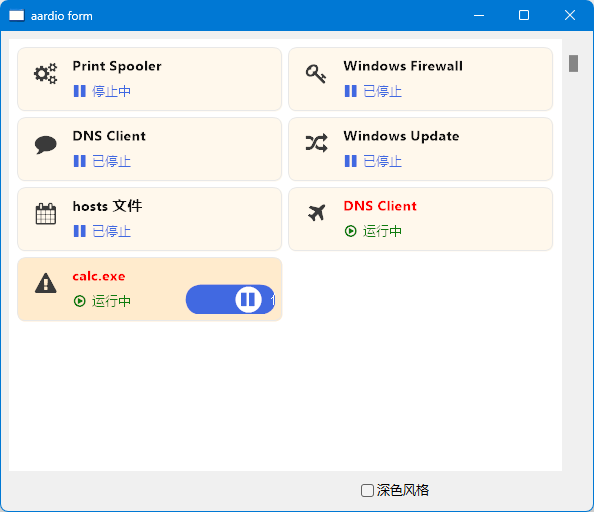
//项目风格——通过paint类型绘制元素不同状态
import win.ui;
import fonts.fontAwesome
import godking.customPlus;
/*DSG{{*/
var winform = win.form(text="aardio form";right=591;bottom=447)
winform.add(
plus={cls="plus";left=8;top=8;right=560;bottom=440;bgcolor=0xC0DCC0;db=1;dl=1;dr=1;dt=1;notify=1;z=1};
scrollbar={cls="scrollbar";left=560;top=8;right=584;bottom=440;db=1;dr=1;dt=1;edge=1;z=2}
)
/*}}*/

var itemModel = {
    // 1. 卡片背景(最底层)
    {
        type="rect";
        rectf={x=3; y=3; width=-3; height=-3}; 
        round=8;
        width=1;
        color=0xFFE8E8E8;
        fillcolor=0xFFFFF8EC;
        itemhoveredfillcolor=0xFFFFEBCD; 
    };
    // 2. 类型大图标(左侧 FontAwesome)
    {
        name="typeIcon";
        type="text";
        rectf={x=12; y=10; width=40; height=42};
        font={name='FontAwesome'; h=22; color=0xFF3A3A3A};
        align=1; 
        valign=1; 
        smooth=true;
        text='\uF085';
    };
    // 3. 服务名称
    {
        name="svcName";
        type="text";
        rectf={x=56; y=10; width=-8; height=24};
        font={name='Tahoma'; h=14; weight=600; color=0xFF111111};
        align=0; 
        valign=1; 
        smooth=true;
    };
    // 4. 状态图标(FontAwesome,底部左侧)
    {
        name="statusIcon";
        type="text";
        rectf={x=56; y=36; width=20; height=24};
        font={name='FontAwesome'; h=14; color=0xFF107C10};
        align=1; 
        valign=1; 
        smooth=true;
        text='\uF111';
    };
    // 5. 状态文字标签(底部)
    {
        name="statusLabel";
        type="text";
        rectf={x=76; y=36; width=-136; height=24};
        font={name='Tahoma'; h=12; color=0xFF107C10};
        align=0; 
        valign=1; 
    };
    // 6. 启动
    {
    	name="start";
    	type="paint",  /* 使用proc()函数进行绘制。proc函数的第1个参数为 godking.paint 对象 */
    	rectf={x=-100;y=-40;width=-10;height=-10}, /* 鼠标定位区域,并传递给proc函数的rectf参数,不用于限制元素绘制区域。负数表示距离项目右边或底边的距离 */
    	proc=function(paint,itemIndex,eleIndex,rectf,disabled,checked,hovered,itemSelected,itemHovered,eleValue){
        	/*  参数:godking.paint对象、当前项目索引、当前元素索引、当前绘制区域、项目是否禁用、元素是否选中、元素是否鼠标划过、项目是否选中、项目是否鼠标划过、项目列表中指定的该元素的值
            	本函数的 owner 对象为customPlus对象。*/
        	paint = toPaint(paint); /* 用于绑定godking.paint智能提示 */
        	if owner.itemList[itemIndex].statusLabel=="运行中" {
        		paint.fillRoundRectF(rectf/*绘制范围RECT*/,25/*圆角半径*/,0xFF008000)
        		var f = ::RECTF(rectf.x+rectf.width-rectf.height+2,rectf.y+2,rectf.height-4,rectf.height-4);
        		paint.fillEllipseF(f /*绘制范围RECTF*/,0xFFFFFFFF);
        		paint.drawTextF(f.offset(2,1) /*文本范围RECTF*/,'\uF04B',::LOGFONT(name="FontAwesome";h=16;color=0xFF008000;),0/*格式*/,1/*水平*/,1/*垂直*/,false/*截短*/)
        		var f = ::RECTF(rectf.x,rectf.y+1*owner.dpi,rectf.width-rectf.height+4,rectf.height);
        		paint.drawTextF( f /*文本范围RECTF*/,"运行中",::LOGFONT(name="宋体";h=12*owner.dpi;color=0xFFFFFFFF;),0/*格式*/,1/*水平*/,1/*垂直*/,false/*截短*/)
        		
        	} else {
        		paint.fillRoundRectF(rectf/*绘制范围RECT*/,25/*圆角半径*/,0xFF4169E1)
         		var f = ::RECTF(rectf.x+2,rectf.y+2,rectf.height-4,rectf.height-4);
        		paint.fillEllipseF(f /*绘制范围RECTF*/,0xFFFFFFFF);
        		paint.drawTextF(f.offset(0,1) /*文本范围RECTF*/,'\uF04C',::LOGFONT(name="FontAwesome";h=16;color=0xFF4169E1;),0/*格式*/,1/*水平*/,1/*垂直*/,false/*截短*/)
        		var f = ::RECTF(rectf.x+rectf.height-4,rectf.y+1*owner.dpi,rectf.width-rectf.height,rectf.height);
        		paint.drawTextF( f /*文本范围RECTF*/,"停止中",::LOGFONT(name="宋体";h=12*owner.dpi;color=0xFFFFFFFF;),0/*格式*/,1/*水平*/,1/*垂直*/,false/*截短*/)
	       	}
    	};
    	/* 以下为可选项 */
    	click=true,  /* 是否响应鼠标点击事件 */
    	hover=true,   /* 是否启用鼠标滑过检测,启用后,cursor、hoveredcolor、hoveredfont等设置才生效 */
    	cursor=32649,    /* 鼠标指针,_IDC_ 开头的常量。 */
	}
 };


itemList = {
	{typeIcon='\uF085'; statusLabel=string.random("运行中","已停止"); svcName="Print Spooler";};
	{typeIcon='\uF084'; statusLabel=string.random("运行中","已停止"); svcName="Windows Firewall";};
	{typeIcon='\uF075'; statusLabel=string.random("运行中","已停止"); svcName="DNS Client";};
	{typeIcon='\uF074'; statusLabel=string.random("运行中","已停止"); svcName="Windows Update";};
	{typeIcon='\uF073'; statusLabel=string.random("运行中","已停止"); svcName="hosts 文件";};
	{typeIcon='\uF072'; statusLabel=string.random("运行中","已停止"); svcName="DNS Client";};
	{typeIcon='\uF071'; statusLabel=string.random("运行中","已停止"); svcName="calc.exe";}
}

var p = godking.customPlus(winform.plus/*plus*/,itemModel,itemList,{
        itemWidth=260,    /*项目宽度*/
        itemHeight=70,    /*项目高度*/
        autoSizeWidth=true,    /*自动根据项目列数及plus宽度调整项目宽度*/
        autoSizeHeight=false,    /*自动根据项目行数及plus高度调整项目高度*/
        colnum=0,     /*项目列数,为0则根据项目宽度和plus宽度自动计算*/
        rownum=0,     /*项目行数,为0则根据项目高度和plus高度自动计算*/
        padLeft=5,    /*plus左边空白距离*/
        padTop=5,    /*plus顶边空白距离*/
        padRight=5,    /*plus右边空白距离*/
        padBottom=5    /*plus底边空白距离*/
})

p.onClick = function(itemIndex/*项目索引*/,elemIndex/*元素索引*/,elemID/*元素id*/,elemName/*元素name*/,pageIndex/*当前页项目索引*/,x/*鼠标X坐标*/,y/*鼠标Y坐标*/,disabled/*项目是否禁用*/,itemRect/*项目区域*/,elemRect/*元素区域*/){
    /*鼠标左键单击非隐藏项目时触发该事件。当项目禁用或没有可点击元素时,默认不触发该事件。可设 allClickEvent=true 启用触发。*/
    if elemName=="start" {
    	if p.itemList[itemIndex].statusLabel=="运行中" {
    		p.itemList[itemIndex].statusLabel="停止中";
    	} else {
    		p.itemList[itemIndex].statusLabel="运行中";
    	}
    }
    p.update(itemIndex);
}

//预设红色字体
var redFont = {name='Tahoma'; h=14; weight=600; color=0xFFFF0000};
p.onDrawElement = function(itemIndex/*项目索引*/,elemIndex/*元素索引*/,elemName/*元素name*/,eleValue/*元素值*/){
	//设置状态文本颜色
	if elemName=="statusLabel" {
		return p.itemList[itemIndex].statusLabel=="运行中"?
			{text=eleValue,font={name='Tahoma'; h=12; color=0xFF107C10}} 
			:{text=eleValue,font={name='Tahoma'; h=12; color=0xFF4169E1}}
	}
	//设置运行时显示图标
	if elemName=="statusIcon" {
		return p.itemList[itemIndex].statusLabel=="运行中"?
			{text='\uF01D',font={name='FontAwesome'; h=14; color=0xFF107C10}} 
			:{text='\uF04C',font={name='FontAwesome'; h=14; color=0xFF4169E1}}		
	}
	//运行中的svcName设置为红色
	if elemName=="svcName" and p.itemList[itemIndex].statusLabel=="运行中" {
		return { text=eleValue; font=redFont }; 
	}
}

p.bindScrollbar(winform.scrollbar);
winform.show();
win.loopMessage();


//项目风格——全模块化风格
import win.ui;
import fonts.fontAwesome
import godking.customPlus;
/*DSG{{*/
var winform = win.form(text="aardio form";right=591;bottom=479)
winform.add(
combobox={cls="combobox";left=384;top=448;right=584;bottom=472;items={"浅色风格","深色风格","橙色风格"};mode="dropdownlist";z=3};
plus={cls="plus";left=8;top=8;right=560;bottom=440;bgcolor=0xC0DCC0;db=1;dl=1;dr=1;dt=1;notify=1;z=1};
scrollbar={cls="scrollbar";left=560;top=8;right=584;bottom=440;db=1;dr=1;dt=1;edge=1;z=2}
)
/*}}*/

// 定义浅色风格模版
var itemModel = {
    bkcolor = 0xFFFFFFFF;
    // 1、卡片背景(最底层)
    {
        type="rect";
        rectf={x=3; y=3; width=-3; height=-3};
        round=8;
        width=1;
        color=0xFFE8E8E8;
        fillcolor=0xFFFFF8EC;
        itemhoveredfillcolor=0xFFFFEBCD;
    };
    // 2、类型大图标(左侧 FontAwesome)
    {
        name="typeIcon";
        type="text";
        rectf={x=12; y=10; width=40; height=42};
        font={name='FontAwesome'; h=22; color=0xFF3A3A3A};
        align=1; 
        valign=1; 
        smooth=true;
        text='\uF085';
    };
    // 3、服务名称
    {
        name="svcName";
        type="text";
        rectf={x=56; y=10; width=-8; height=24};
        font={name='Tahoma'; h=14; weight=600; color=0xFFFF0000};
        font_stop={name='Tahoma'; h=14; weight=600; color=0xFF111111};
        align=0; 
        valign=1; 
        smooth=true;
    };
    // 4、状态图标(FontAwesome,底部左侧)
    {
        name="statusIcon";
        type="text";
        rectf={x=56; y=36; width=20; height=24};
        font={name='FontAwesome'; h=14; color=0xFF107C10};
        font_stop={name='FontAwesome'; h=14; color=0xFF4169E1};
        align=1; 
        valign=1; 
        smooth=true;
        text='\uF111';
    };
    // 5、状态文字标签(底部)
    {
        name="statusLabel";
        type="text";
        rectf={x=76; y=36; width=-136; height=24};
        font={name='Tahoma'; h=12; color=0xFF107C10};
        font_stop={name='Tahoma'; h=12; color=0xFF4169E1};
        align=0; 
        valign=1; 
    };
    // 6、启动
    {
        name="start";
        type="paint",  /* 使用proc()函数进行绘制。proc函数的第1个参数为 godking.paint 对象 */
        rectf={x=-100;y=-40;width=-10;height=-10}, /* 鼠标定位区域,并传递给proc函数的rectf参数,不用于限制元素绘制区域。负数表示距离项目右边或底边的距离 */
        runcolor = 0xFF008000;
        stopcolor = 0xFF4169E1;
        proc=function(paint,itemIndex,eleIndex,rectf,disabled,checked,hovered,itemSelected,itemHovered,eleValue){
            /*  参数:godking.paint对象、当前项目索引、当前元素索引、当前绘制区域、项目是否禁用、元素是否选中、元素是否鼠标划过、项目是否选中、项目是否鼠标划过、项目列表中指定的该元素的值
                本函数的 owner 对象为customPlus对象。*/
            paint = toPaint(paint); /* 用于绑定godking.paint智能提示 */
            paint.clip.set(rectf,0,0);
            var runcolor = owner.itemModel[eleIndex].runcolor;
            var stopcolor = owner.itemModel[eleIndex].stopcolor;
            if owner.itemList[itemIndex].statusLabel=="运行中" {
                if eleValue>0 {
                    // 按钮背景色渐变转换
                    paint.fillRoundRectF(rectf/*绘制范围RECT*/,25/*圆角半径*/,stopcolor);
                    var r,g,b,a = gdi.getRgba(runcolor);
                    var argb = gdi.ARGB(r,g,b,eleValue*255);
                    paint.fillRoundRectF(rectf/*绘制范围RECT*/,25/*圆角半径*/,argb);
                    // 绘制按钮内容
                    var offset = ((rectf.x+rectf.width-rectf.height+2) - (rectf.x+2))*eleValue;
                    var f = ::RECTF(rectf.x+2+offset,rectf.y+2,rectf.height-4,rectf.height-4);
                    paint.fillEllipseF(f /*绘制范围RECTF*/,0xFFFFFFFF);
                    paint.drawTextF(f.offset(0,1) /*文本范围RECTF*/,'\uF04C',::LOGFONT(name="FontAwesome";h=16;color=stopcolor;),0/*格式*/,1/*水平*/,1/*垂直*/,false/*截短*/)
                    var f = ::RECTF(rectf.x+rectf.height-4+offset,rectf.y+1*owner.dpi,rectf.width-rectf.height,rectf.height);
                    paint.drawTextF( f /*文本范围RECTF*/,"停止中",::LOGFONT(name="宋体";h=12*owner.dpi;color=0xFFFFFFFF;),0/*格式*/,1/*水平*/,1/*垂直*/,false/*截短*/)
                } else {
                    paint.fillRoundRectF(rectf/*绘制范围RECT*/,25/*圆角半径*/,runcolor)
                    var f = ::RECTF(rectf.x+rectf.width-rectf.height+2,rectf.y+2,rectf.height-4,rectf.height-4);
                    paint.fillEllipseF(f /*绘制范围RECTF*/,0xFFFFFFFF);
                    paint.drawTextF(f.offset(2,1) /*文本范围RECTF*/,'\uF04B',::LOGFONT(name="FontAwesome";h=16;color=runcolor;),0/*格式*/,1/*水平*/,1/*垂直*/,false/*截短*/)
                    var f = ::RECTF(rectf.x,rectf.y+1*owner.dpi,rectf.width-rectf.height+4,rectf.height);
                    paint.drawTextF( f /*文本范围RECTF*/,"运行中",::LOGFONT(name="宋体";h=12*owner.dpi;color=0xFFFFFFFF;),0/*格式*/,1/*水平*/,1/*垂直*/,false/*截短*/)
                }
            } else {
                if eleValue>0 {
                    // 按钮背景色渐变转换
                    paint.fillRoundRectF(rectf/*绘制范围RECT*/,25/*圆角半径*/,runcolor);
                    var r,g,b,a = gdi.getRgba(stopcolor);
                    var argb = gdi.ARGB(r,g,b,eleValue*255);
                    paint.fillRoundRectF(rectf/*绘制范围RECT*/,25/*圆角半径*/,argb);
                    // 绘制按钮内容
                    var offset = ((rectf.x+rectf.width-rectf.height+2) - (rectf.x+2))*eleValue;
                    var f = ::RECTF(rectf.x+rectf.width-rectf.height+2-offset,rectf.y+2,rectf.height-4,rectf.height-4);
                    paint.fillEllipseF(f /*绘制范围RECTF*/,0xFFFFFFFF);
                    paint.drawTextF(f.offset(2,1) /*文本范围RECTF*/,'\uF04B',::LOGFONT(name="FontAwesome";h=16;color=runcolor;),0/*格式*/,1/*水平*/,1/*垂直*/,false/*截短*/)
                    var f = ::RECTF(rectf.x-offset,rectf.y+1*owner.dpi,rectf.width-rectf.height+4,rectf.height);
                    paint.drawTextF( f /*文本范围RECTF*/,"运行中",::LOGFONT(name="宋体";h=12*owner.dpi;color=0xFFFFFFFF;),0/*格式*/,1/*水平*/,1/*垂直*/,false/*截短*/)
                } else {
                    paint.fillRoundRectF(rectf/*绘制范围RECT*/,25/*圆角半径*/,stopcolor)
                    var f = ::RECTF(rectf.x+2,rectf.y+2,rectf.height-4,rectf.height-4);
                    paint.fillEllipseF(f /*绘制范围RECTF*/,0xFFFFFFFF);
                    paint.drawTextF(f.offset(0,1) /*文本范围RECTF*/,'\uF04C',::LOGFONT(name="FontAwesome";h=16;color=stopcolor;),0/*格式*/,1/*水平*/,1/*垂直*/,false/*截短*/)
                    var f = ::RECTF(rectf.x+rectf.height-4,rectf.y+1*owner.dpi,rectf.width-rectf.height,rectf.height);
                    paint.drawTextF( f /*文本范围RECTF*/,"停止中",::LOGFONT(name="宋体";h=12*owner.dpi;color=0xFFFFFFFF;),0/*格式*/,1/*水平*/,1/*垂直*/,false/*截短*/)
                }
               }
        };
        /* 以下为可选项 */
        click=true,  /* 是否响应鼠标点击事件 */
        hover=true,   /* 是否启用鼠标滑过检测,启用后,cursor、hoveredcolor、hoveredfont等设置才生效 */
        cursor=32649,    /* 鼠标指针,_IDC_ 开头的常量。 */
    }
 };

// 定义深色风格模版
var itemModel_dark = ..table.clone(itemModel);
itemModel_dark.bkcolor=0xFF778899;
itemModel_dark[1].fillcolor=0xFF003153;
itemModel_dark[1].itemhoveredfillcolor=0xFF0047AB;     
itemModel_dark[2].font.color = 0xFFFFFACD;
itemModel_dark[3].font.color = 0xFFFF4500;
itemModel_dark[3].font_stop.color = 0xFFFFFFFF;
itemModel_dark[4].font.color = 0xFFADFF2F;
itemModel_dark[4].font_stop.color = 0xFF00FFFF;
itemModel_dark[5].font.color = 0xFFADFF2F;
itemModel_dark[5].font_stop.color = 0xFF00FFFF;

// 定义橙色风格模版
var itemModel_red = ..table.clone(itemModel);
itemModel_red.bkcolor=0xFFFF4500;
itemModel_red[1].fillcolor=0xFFFFE4E1;
itemModel_red[1].itemhoveredfillcolor=0xFFFFB6C1;     
itemModel_red[2].font.color = 0xFFFF4500;
itemModel_red[3].font.color = 0xFFFF4500;
itemModel_red[3].font_stop.color = 0xFF000000;
itemModel_red[4].font.color = 0xFF228B22;
itemModel_red[4].font_stop.color = 0xFF8B4513;
itemModel_red[5].font.color = 0xFF228B22;
itemModel_red[5].font_stop.color = 0xFF8B4513;
itemModel_red[6].runcolor = 0xFFFF4500;
itemModel_red[6].stopcolor = 0xFF9400D3;

// 定义项目列表
itemList = {
    {typeIcon='\uF085'; start=0; statusLabel=string.random("运行中","已停止"); svcName="Print Spooler";};
    {typeIcon='\uF084'; start=0; statusLabel=string.random("运行中","已停止"); svcName="Windows Firewall";};
    {typeIcon='\uF075'; start=0; statusLabel=string.random("运行中","已停止"); svcName="DNS Client";};
    {typeIcon='\uF074'; start=0; statusLabel=string.random("运行中","已停止"); svcName="Windows Update";};
    {typeIcon='\uF073'; start=0; statusLabel=string.random("运行中","已停止"); svcName="hosts 文件";};
    {typeIcon='\uF072'; start=0; statusLabel=string.random("运行中","已停止"); svcName="DNS Client";};
    {typeIcon='\uF071'; start=0; statusLabel=string.random("运行中","已停止"); svcName="calc.exe";}
}

// 定义customPlus组件对象
var p = godking.customPlus(winform.plus/*plus*/,itemModel,itemList,{
        itemWidth=260,    /*项目宽度*/
        itemHeight=70,    /*项目高度*/
        autoSizeWidth=true,    /*自动根据项目列数及plus宽度调整项目宽度*/
        autoSizeHeight=false,    /*自动根据项目行数及plus高度调整项目高度*/
        colnum=0,     /*项目列数,为0则根据项目宽度和plus宽度自动计算*/
        rownum=0,     /*项目行数,为0则根据项目高度和plus高度自动计算*/
        padLeft=5,    /*plus左边空白距离*/
        padTop=5,    /*plus顶边空白距离*/
        padRight=5,    /*plus右边空白距离*/
        padBottom=5    /*plus底边空白距离*/
})

// customPlus组件点击按钮事件
p.onClick = function(itemIndex/*项目索引*/,eleIndex/*元素索引*/,eleID/*元素id*/,eleName/*元素name*/,pageIndex/*当前页项目索引*/,x/*鼠标X坐标*/,y/*鼠标Y坐标*/,disabled/*项目是否禁用*/,itemRect/*项目区域*/,eleRect/*元素区域*/){
    /*鼠标左键单击非隐藏项目时触发该事件。当项目禁用或没有可点击元素时,默认不触发该事件。可设 allClickEvent=true 启用触发。*/
    if eleName=="start" {
        for(i=10,1,-1){
            p.itemList[itemIndex].start = i/10;
            p.update(itemIndex);
            win.delay(10);
        }
        p.itemList[itemIndex].start = 0;
        if p.itemList[itemIndex].statusLabel=="运行中" {
            p.itemList[itemIndex].statusLabel="停止中";
        } else {
            p.itemList[itemIndex].statusLabel="运行中";
        }
        p.update(itemIndex);
    }
}

// customPlus组件绘制元素事件
p.onDrawElement = function(itemIndex/*项目索引*/,eleIndex/*元素索引*/,eleName/*元素name*/,eleValue/*元素值*/){
    //设置运行与停止状态时,不同的文本颜色
    if eleName=="statusLabel" or eleName=="svcName" {
        var font = p.itemList[itemIndex].statusLabel=="运行中"?p.itemModel[eleIndex].font:p.itemModel[eleIndex].font_stop;
        return {text=eleValue,font=font} //文本不变,字体改变
    }
    //设置运行与停止状态时,不同的图标文本和颜色
    if eleName=="statusIcon" {
        var font = p.itemList[itemIndex].statusLabel=="运行中"?p.itemModel[eleIndex].font:p.itemModel[eleIndex].font_stop;
        var text = p.itemList[itemIndex].statusLabel=="运行中"?'\uF01D':'\uF04C';
        return {text=text,font=font} //文本和字体都改变
    }
}

// 切换customPlus风格
winform.combobox.oncommand = function(id,event){
    var model = ({itemModel,itemModel_dark,itemModel_red})[winform.combobox.selIndex];
    p.init( model/*项目模板*/,model.bkcolor/*背景颜色*/,/*背景图像*/,/*竖向排列*/);
}

// customPlus组件绑定滚动条
p.bindScrollbar(winform.scrollbar);
winform.show();
win.loopMessage();


最新回复 (26)
  • 我高兴 20天前
    0 2
    oh my god
  • nanyi 20天前
    0 3
    光大处处有惊喜,十分强大,想着可以用到哪里呢?
  • nanyi 20天前
    0 4
    提示:需要更新下最新的godking.customPlus
  • yuantian 20天前
    0 5
    真的棒👍,效果超级好
  • playboyeve 20天前
    0 6
    漂亮
  • Mr_MAO 20天前
    0 7
    真的很棒👍👍👍
  • mndsoft 19天前
    0 8

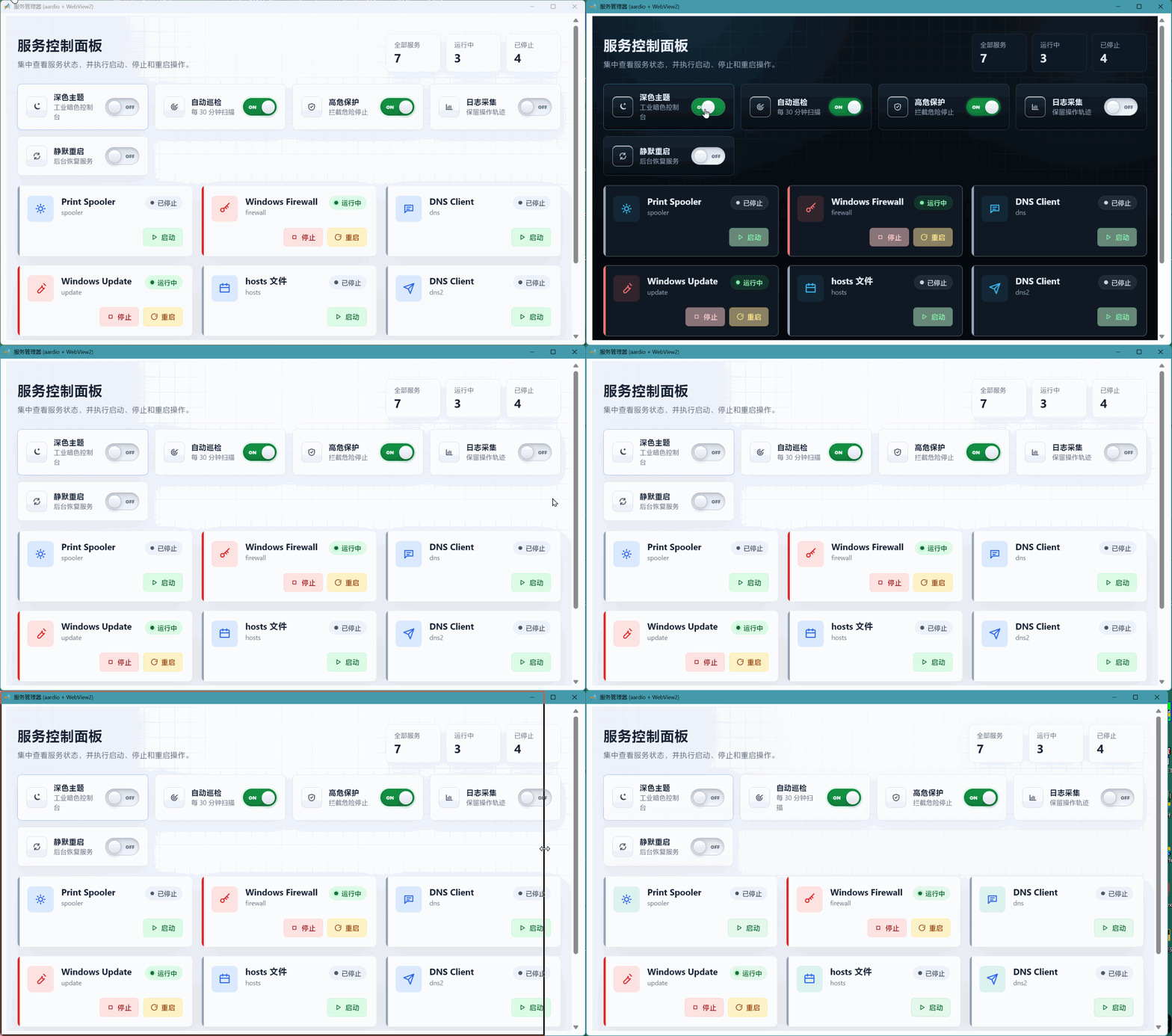
    现在我基本都是这么干,扬 web.view所长,避 aardio所短

    解决了 godking.resHtml 无法每次 exe 启动端口不同、localStorage origin 变化、数据丢失的根本原因

    在 godking.resHtml(...) 之前加一行固定端口号,但可能会冲突:

      import wsock.tcp.simpleHttpServer;

      wsock.tcp.simpleHttpServer.startPort = 18765; // 固定端口,localStorage origin 不再变化


    ```aardio 
    import win.ui;
    import sevenZip.lzma;
    import godking.resHtml;
     import web.view;
     import wsock.tcp.simpleHttpServer;
    /*DSG{{*/
    var winform = win.form(text="aardio form";right=1083;bottom=635)
    winform.add(
    custom={cls="custom";text="自定义控件";left=2;top=3;right=1079;bottom=631;db=1;dl=1;dr=1;dt=1;z=1}
    )
    /*}}*/
    
    wsock.tcp.simpleHttpServer.startPort = 18766;
    var resHtml = godking.resHtml($ /*资源目录*/,"service_panel_demo.html"/*首页文件名*/,/*内容获取函数代码*/,/*资源解密函数代码*/);
    var wb = web.view(winform.custom);
    
    // 2. 定义外部接口 (Aardio 后台逻辑,用于接收前端点击信号)
    wb.external = {
        serviceAction = function(serviceId, action) {
            // 模拟后台耗时操作
            import time;
            
            console.log(`收到命令: ID=${serviceId}, 动作=${action}`);
            
            // === 下面是核心逻辑区 === 
            // 如果你想控制真正的 Windows 服务,请取消下面对应的注释并替换服务名:
            // import win.service;
            // var svc = win.service("YourServiceName"); 
            // if(action == "start") svc.start();
            // if(action == "stop") svc.stop();
            // if(action == "restart") { svc.stop(); time.sleep(500); svc.start(); }
    
            // 为了演示 UI 交互效果,这里使用模拟状态改变
            var newStatus = "stopped";
            if(action == "start") {
                newStatus = "running";
                time.sleep(500); // 模拟启动耗时
            } else if(action == "stop") {
                newStatus = "stopped";
                time.sleep(500);
            } else if(action == "restart") {
                // 重启稍微复杂点,模拟:停止 -> 启动
                newStatus = "running"; 
                time.sleep(1000);
            }
    
            // 3. 操作完成后,回调通知前端更新 UI
            wb.invoke("updateServiceStatus", serviceId, newStatus);
            console.log(`状态更新完成: ID=${serviceId}, 新状态=${newStatus}`);
        }
    }
    
    
    wb.go(resHtml.url); 
    
    winform.show();
    win.loopMessage();
    
    ```


    上传的附件:
  • 光庆 18天前
    0 9
    mndsoft 现在我基本都是这么干,扬 web.view所长,避 aardio所短。另外请教庆老大,如果使用你的 godking.resHtml 库实现 localStorage功能?aardio官方文档说明: ...
    主要目的就是支持读取本地文件、资源文件,原理相当于一个中间件,客户需要什么文件,通过这个库自己去读出来,然后发给客户。所以,通过这个中间件进行中转,就可以实现对本地、资源中,加密的文件进行解密操作,然后把解密后的文件内容发送给客户。
  • 光庆 18天前
    0 10
    mndsoft 现在我基本都是这么干,扬 web.view所长,避 aardio所短。另外请教庆老大,如果使用你的 godking.resHtml 库实现 localStorage功能?aardio官方文档说明: ...

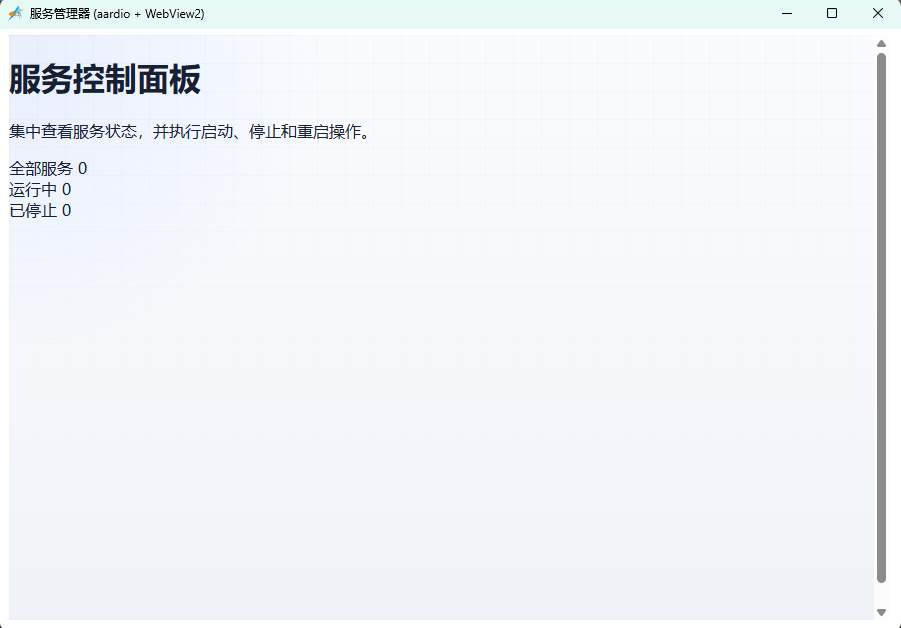
    你这段代码,我运行后是这样的,不知道哪里有问题:

  • mndsoft 18天前
    0 11
    可能html代码复制不是最新的,已经重新使用你的godking.resHtml弄了个示例,并解决了 localStorage origin 变化无法保存主题状态的问题。
  • nanyi 18天前
    0 12
    @光大,使用godking.customPlus这个库的界面,卡片内的文字显示不是很锐利,边缘都有点虚。
  • 光庆 18天前
    1 13
    nanyi @光大,使用godking.customPlus这个库的界面,卡片内的文字显示不是很锐利,边缘都有点虚。

    smooth = true 就会平滑处理,感觉虚。 smooth = false 就会很锐利、清晰,但有些字体锯齿感严重。

    一般使用宋体时,可以 smooth = false 。

  • nanyi 18天前
    0 14
    光庆 smooth = true 就会平滑处理,感觉虚。 smooth = false 就会很锐利、清晰,但有些字体锯齿感严重。一般使用宋体时,可以 smooth = false 。
    好的,谢谢光大
  • niheibie 18天前
    0 15
    666666666
  • 近我者赤 18天前
    0 16

    第三个类型运行后不显示按钮了,点击时才出现

  • 光庆 18天前
    0 17
    近我者赤 第三个类型运行后不显示按钮了,点击时才出现
    更新一下库试试
  • 近我者赤 18天前
    0 18
    光庆 更新一下库试试
    更新后可以了
  • 近我者赤 16天前
    0 19
    大佬,怎样让每个项目有不同的背景色?最好能与项目相关联.
  • 光庆 16天前
    0 20
    近我者赤 大佬,怎样让每个项目有不同的背景色?最好能与项目相关联.
    //项目风格——通过改变元素的hide属性实现多元素切换显示
    import win.ui;
    import fonts.fontAwesome
    import godking.customPlus;
    /*DSG{{*/
    var winform = win.form(text="aardio form";right=591;bottom=479)
    winform.add(
    checkbox={cls="checkbox";text="深色风格";left=384;top=448;right=584;bottom=472;z=3};
    plus={cls="plus";left=8;top=8;right=560;bottom=440;bgcolor=0xC0DCC0;db=1;dl=1;dr=1;dt=1;notify=1;z=1};
    scrollbar={cls="scrollbar";left=560;top=8;right=584;bottom=440;db=1;dr=1;dt=1;edge=1;z=2}
    )
    /*}}*/
    
    var itemModel = {
        // 1. 卡片背景(最底层)
        {
            name="bk";
            type="rect";
            rectf={x=3; y=3; width=-3; height=-3}; 
            round=8;
            width=1;
            color=0xFFE8E8E8;
            fillcolor=0xFFFFF8EC;
            itemhoveredfillcolor=0xFFFFEBCD; 
        };
        // 2. 类型大图标(左侧 FontAwesome)
        {
            name="typeIcon";
            type="text";
            rectf={x=12; y=10; width=40; height=42};
            font={name='FontAwesome'; h=22; color=0xFF3A3A3A};
            align=1; 
            valign=1; 
            smooth=true;
            text='\uF085';
        };
        // 3. 服务名称
        {
            name="svcName";
            type="text";
            rectf={x=56; y=10; width=-8; height=24};
            font={name='Tahoma'; h=14; weight=600; color=0xFF111111};
            align=0; 
            valign=1; 
            smooth=true;
        };
        // 4. 状态图标(FontAwesome,底部左侧)
        {
            name="statusIcon";
            type="text";
            rectf={x=56; y=36; width=20; height=24};
            font={name='FontAwesome'; h=14; color=0xFF107C10};
            align=1; 
            valign=1; 
            smooth=true;
            text='\uF111';
        };
        // 5. 状态文字标签(底部)
        {
            name="statusLabel";
            type="text";
            rectf={x=76; y=36; width=-136; height=24};
            font={name='Tahoma'; h=12; color=0xFF107C10};
            align=0; 
            valign=1; 
        };
        // 6. 停止按钮背景
        {
            name="btnStopBg";
            type="rect";
            rectf={x=-128; y=36; width=-68; height=24};
            round=4; 
            //width=0;
            //color=0xAAC42B1A; 
            fillcolor=0xFFFF4500;
            hoveredfillcolor=0xFFFF0000;
            hover=true; 
            cursor=32649/*_IDC_HAND*/; 
            click=true;
        };
        // 7. 停止按钮文字
        {
            name="btnStopText";
            type="text";
            rectf={x=-128; y=36; width=-68; height=24};
            font={name='FontAwesome'; h=12; color=0xFFFFFFFF};
            align=1; 
            valign=1; 
            text='\uF28D 停止';
        };
        // 8. 重启按钮背景
        {
            name="btnRestartBg";
            type="rect";
            rectf={x=-64; y=36; width=-8; height=24};
            round=4; 
            //width=0;
            //color=0xAA876400; 
            fillcolor=0xFF4169E1;
            hoveredfillcolor=0xFF0047AB;
            hover=true; 
            cursor=32649; 
            click=true;
        };
        // 9. 重启按钮文字
        {
            name="btnRestartText";
            type="text";
            rectf={x=-64; y=36; width=-8; height=24};
            font={name='FontAwesome'; h=12; color=0xFFFFFFFF};
            align=1; 
            valign=1; 
            text='\uF1DA 重启';
        };
        // 10. 启动/操作按钮背景
        {
            name="btnStartBg";
            type="rect";
            rectf={x=-128; y=36; width=-8; height=24};
            round=4; 
            width=1;
            color=0xAA107C10; 
            fillcolor=0xFF90EE90;
            hoveredfillcolor=0xFF7CFC00;
            hover=true; 
            cursor=32649; 
            click=true;
        };
        // 11. 启动/操作按钮文字
        {
            name="btnStartText";
            type="text";
            rectf={x=-128; y=36; width=-8; height=24};
            font={name='FontAwesome'; h=12; color=0xFF000000};
            align=1; 
            valign=1;
            text='\uF061 启动';
        };
     };
    
    var itemModel_dark = ..table.clone(itemModel);
    itemModel_dark[1].fillcolor=0xFF003153;
    itemModel_dark[1].itemhoveredfillcolor=0xFF0047AB; 	
    itemModel_dark[2].font.color = 0xFFFFFACD;
    itemModel_dark[3].font.color = 0xFFFFFFFF;
    itemModel_dark[4].font.color = 0xFF107C10;
    itemModel_dark[5].font.color = 0xFFFFC0CB;
    itemModel_dark[9].font.color = 0xFFE0FFFF;
    
    itemList = {
    	{typeIcon='\uF085'; statusLabel=string.random("运行中","已停止"); svcName="Print Spooler";};
    	{typeIcon='\uF084'; statusLabel=string.random("运行中","已停止"); svcName="Windows Firewall";};
    	{typeIcon='\uF075'; statusLabel=string.random("运行中","已停止"); svcName="DNS Client";};
    	{typeIcon='\uF074'; statusLabel=string.random("运行中","已停止"); svcName="Windows Update";};
    	{typeIcon='\uF073'; statusLabel=string.random("运行中","已停止"); svcName="hosts 文件";};
    	{typeIcon='\uF072'; statusLabel=string.random("运行中","已停止"); svcName="DNS Client";};
    	{typeIcon='\uF071'; statusLabel=string.random("运行中","已停止"); svcName="calc.exe";}
    }
    
    var p = godking.customPlus(winform.plus/*plus*/,itemModel,itemList,{
            itemWidth=260,    /*项目宽度*/
            itemHeight=70,    /*项目高度*/
            autoSizeWidth=true,    /*自动根据项目列数及plus宽度调整项目宽度*/
            autoSizeHeight=false,    /*自动根据项目行数及plus高度调整项目高度*/
            colnum=0,     /*项目列数,为0则根据项目宽度和plus宽度自动计算*/
            rownum=0,     /*项目行数,为0则根据项目高度和plus高度自动计算*/
            padLeft=5,    /*plus左边空白距离*/
            padTop=5,    /*plus顶边空白距离*/
            padRight=5,    /*plus右边空白距离*/
            padBottom=5    /*plus底边空白距离*/
    })
    
    p.onClick = function(itemIndex/*项目索引*/,elemIndex/*元素索引*/,elemID/*元素id*/,elemName/*元素name*/,pageIndex/*当前页项目索引*/,x/*鼠标X坐标*/,y/*鼠标Y坐标*/,disabled/*项目是否禁用*/,itemRect/*项目区域*/,elemRect/*元素区域*/){
        /*鼠标左键单击非隐藏项目时触发该事件。当项目禁用或没有可点击元素时,默认不触发该事件。可设 allClickEvent=true 启用触发。*/
        if elemName=="btnStartBg" {
        	p.itemList[itemIndex].statusLabel="运行中";
        }
        if elemName=="btnStopBg" {
        	p.itemList[itemIndex].statusLabel="停止";
        }
        if elemName=="btnRestartBg" {
        	win.msgbox("重启完毕");
        }
        p.update(itemIndex);
    }
    
    //预设红色字体
    var redFont = {name='Tahoma'; h=14; weight=600; color=0xFFFF0000};
    p.onDrawElement = function(itemIndex/*项目索引*/,elemIndex/*元素索引*/,elemName/*元素name*/,eleValue/*元素值*/){
    	//设置不同的项目背景色
    	if elemName=="bk"  {
    		return p.itemList[itemIndex].statusLabel=="运行中"?
    			{fillcolor=0xFF98FB98;itemhoveredfillcolor=0xFF90EE90}:
    			{fillcolor=0xFFFFE4E1;itemhoveredfillcolor=0xFFFFC0CB};
    	}	
    	//设置各按钮的隐藏状态
    	if elemName=="btnRestartBg" or elemName=="btnRestartText" or elemName=="btnStopBg" or elemName=="btnStopText"  {
    		return { hide = p.itemList[itemIndex].statusLabel!="运行中" },true; 
    	}
    	if elemName=="btnStartBg" or elemName=="btnStartText" {
    		return { hide = p.itemList[itemIndex].statusLabel=="运行中" },true; 
    	}
    	//设置运行时显示图标
    	if elemName=="statusIcon" {
    		return p.itemList[itemIndex].statusLabel=="运行中"?'\uF01D':'\uF04C'; 
    	}
    	//运行中的svcName设置为红色
    	if elemName=="svcName" and p.itemList[itemIndex].statusLabel=="运行中" {
    		return { text=eleValue; font=redFont }; 
    	}
    }
    
    winform.checkbox.oncommand = function(id,event){
    	if owner.checked {
    		p.init( itemModel_dark/*项目模板*/,0xFF778899/*背景颜色*/,/*背景图像*/,/*竖向排列*/)
    	} else {
    		p.init( itemModel/*项目模板*/,0xFFFFFFFF/*背景颜色*/,/*背景图像*/,/*竖向排列*/)
    	}
    }
    
    p.bindScrollbar(winform.scrollbar);
    winform.show();
    win.loopMessage();


  • 近我者赤 16天前
    0 21
    大佬,不是我想要的,我的意思是每个项目有不同的背景色,不是不同运行状态有不同背景色
  • 光庆 16天前
    0 22
    近我者赤 大佬,不是我想要的,我的意思是每个项目有不同的背景色,不是不同运行状态有不同背景色

    原理就是这么个原理,你根据自己的情况改一下:

    //项目风格——通过改变元素的hide属性实现多元素切换显示
    import win.ui;
    import fonts.fontAwesome
    import godking.customPlus;
    /*DSG{{*/
    var winform = win.form(text="aardio form";right=591;bottom=479)
    winform.add(
    checkbox={cls="checkbox";text="深色风格";left=384;top=448;right=584;bottom=472;z=3};
    checkbox2={cls="checkbox";text="自动分析背景色";left=144;top=448;right=344;bottom=472;z=4};
    plus={cls="plus";left=8;top=8;right=560;bottom=440;bgcolor=0xC0DCC0;db=1;dl=1;dr=1;dt=1;notify=1;z=1};
    scrollbar={cls="scrollbar";left=560;top=8;right=584;bottom=440;db=1;dr=1;dt=1;edge=1;z=2}
    )
    /*}}*/
    
    var itemModel = {
        // 1. 卡片背景(最底层)
        {
            name="bk";
            type="rect";
            rectf={x=3; y=3; width=-3; height=-3}; 
            round=8;
            width=1;
            color=0xFFE8E8E8;
            fillcolor=0xFFFFF8EC;
            itemhoveredfillcolor=0xFFFFEBCD; 
        };
        // 2. 类型大图标(左侧 FontAwesome)
        {
            name="typeIcon";
            type="text";
            rectf={x=12; y=10; width=40; height=42};
            font={name='FontAwesome'; h=22; color=0xFF3A3A3A};
            align=1; 
            valign=1; 
            smooth=true;
            text='\uF085';
        };
        // 3. 服务名称
        {
            name="svcName";
            type="text";
            rectf={x=56; y=10; width=-8; height=24};
            font={name='Tahoma'; h=14; weight=600; color=0xFF111111};
            align=0; 
            valign=1; 
            smooth=true;
        };
        // 4. 状态图标(FontAwesome,底部左侧)
        {
            name="statusIcon";
            type="text";
            rectf={x=56; y=36; width=20; height=24};
            font={name='FontAwesome'; h=14; color=0xFF107C10};
            align=1; 
            valign=1; 
            smooth=true;
            text='\uF111';
        };
        // 5. 状态文字标签(底部)
        {
            name="statusLabel";
            type="text";
            rectf={x=76; y=36; width=-136; height=24};
            font={name='Tahoma'; h=12; color=0xFF107C10};
            align=0; 
            valign=1; 
        };
        // 6. 停止按钮背景
        {
            name="btnStopBg";
            type="rect";
            rectf={x=-128; y=36; width=-68; height=24};
            round=4; 
            fillcolor=0xFFFF4500;
            hoveredfillcolor=0xFFFF0000;
            hover=true; 
            cursor=32649/*_IDC_HAND*/; 
            click=true;
        };
        // 7. 停止按钮文字
        {
            name="btnStopText";
            type="text";
            rectf={x=-128; y=36; width=-68; height=24};
            font={name='FontAwesome'; h=12; color=0xFFFFFFFF};
            align=1; 
            valign=1; 
            text='\uF28D 停止';
        };
        // 8. 重启按钮背景
        {
            name="btnRestartBg";
            type="rect";
            rectf={x=-64; y=36; width=-8; height=24};
            round=4; 
            fillcolor=0xFF4169E1;
            hoveredfillcolor=0xFF0047AB;
            hover=true; 
            cursor=32649; 
            click=true;
        };
        // 9. 重启按钮文字
        {
            name="btnRestartText";
            type="text";
            rectf={x=-64; y=36; width=-8; height=24};
            font={name='FontAwesome'; h=12; color=0xFFFFFFFF};
            align=1; 
            valign=1; 
            text='\uF1DA 重启';
        };
        // 10. 启动/操作按钮背景
        {
            name="btnStartBg";
            type="rect";
            rectf={x=-128; y=36; width=-8; height=24};
            round=4; 
            width=1;
            color=0xAA107C10; 
            fillcolor=0xFF90EE90;
            hoveredfillcolor=0xFF7CFC00;
            hover=true; 
            cursor=32649; 
            click=true;
        };
        // 11. 启动/操作按钮文字
        {
            name="btnStartText";
            type="text";
            rectf={x=-128; y=36; width=-8; height=24};
            font={name='FontAwesome'; h=12; color=0xFF000000};
            align=1; 
            valign=1;
            text='\uF061 启动';
        };
     };
    
    var itemModel_dark = ..table.clone(itemModel);
    itemModel_dark[1].fillcolor=0xFF003153;
    itemModel_dark[1].itemhoveredfillcolor=0xFF0047AB; 	
    itemModel_dark[2].font.color = 0xFFFFFACD;
    itemModel_dark[3].font.color = 0xFFFFFFFF;
    itemModel_dark[4].font.color = 0xFF107C10;
    itemModel_dark[5].font.color = 0xFFFFC0CB;
    itemModel_dark[9].font.color = 0xFFE0FFFF;
    
    itemList = {
    	{bk=0xFFFF0000; typeIcon='\uF085'; statusLabel=string.random("运行中","已停止"); svcName="Print Spooler";};
    	{bk=0xFFFFFF00; typeIcon='\uF084'; statusLabel=string.random("运行中","已停止"); svcName="Windows Firewall";};
    	{bk=0xFFFF00FF; typeIcon='\uF075'; statusLabel=string.random("运行中","已停止"); svcName="DNS Client";};
    	{bk=0xFF00FF00; typeIcon='\uF074'; statusLabel=string.random("运行中","已停止"); svcName="Windows Update";};
    	{bk=0xFF0000FF; typeIcon='\uF073'; statusLabel=string.random("运行中","已停止"); svcName="hosts 文件";};
    	{bk=0xFF00FFFF; typeIcon='\uF072'; statusLabel=string.random("运行中","已停止"); svcName="DNS Client";};
    	{bk=0xFF775533; typeIcon='\uF071'; statusLabel=string.random("运行中","已停止"); svcName="calc.exe";}
    }
    
    var p = godking.customPlus(winform.plus/*plus*/,itemModel,itemList,{
            itemWidth=260,    /*项目宽度*/
            itemHeight=70,    /*项目高度*/
            autoSizeWidth=true,    /*自动根据项目列数及plus宽度调整项目宽度*/
            autoSizeHeight=false,    /*自动根据项目行数及plus高度调整项目高度*/
            colnum=0,     /*项目列数,为0则根据项目宽度和plus宽度自动计算*/
            rownum=0,     /*项目行数,为0则根据项目高度和plus高度自动计算*/
            padLeft=5,    /*plus左边空白距离*/
            padTop=5,    /*plus顶边空白距离*/
            padRight=5,    /*plus右边空白距离*/
            padBottom=5    /*plus底边空白距离*/
    })
    
    p.onClick = function(itemIndex/*项目索引*/,elemIndex/*元素索引*/,elemID/*元素id*/,elemName/*元素name*/,pageIndex/*当前页项目索引*/,x/*鼠标X坐标*/,y/*鼠标Y坐标*/,disabled/*项目是否禁用*/,itemRect/*项目区域*/,elemRect/*元素区域*/){
        /*鼠标左键单击非隐藏项目时触发该事件。当项目禁用或没有可点击元素时,默认不触发该事件。可设 allClickEvent=true 启用触发。*/
        if elemName=="btnStartBg" {
        	p.itemList[itemIndex].statusLabel="运行中";
        }
        if elemName=="btnStopBg" {
        	p.itemList[itemIndex].statusLabel="停止";
        }
        if elemName=="btnRestartBg" {
        	win.msgbox("重启完毕");
        }
        p.update(itemIndex);
    }
    
    //预设红色字体
    var redFont = {name='Tahoma'; h=14; weight=600; color=0xFFFF0000};
    p.onDrawElement = function(itemIndex/*项目索引*/,elemIndex/*元素索引*/,elemName/*元素name*/,eleValue/*元素值*/){
    	//设置不同的项目背景色
    	if elemName=="bk" and winform.checkbox2.checked {
    		return p.itemList[itemIndex].statusLabel=="运行中"?
    			{fillcolor=0xFF98FB98;itemhoveredfillcolor=0xFF90EE90}:
    			{fillcolor=0xFFFFE4E1;itemhoveredfillcolor=0xFFFFC0CB};
    	}	
    	//设置各按钮的隐藏状态
    	if elemName=="btnRestartBg" or elemName=="btnRestartText" or elemName=="btnStopBg" or elemName=="btnStopText"  {
    		return { hide = p.itemList[itemIndex].statusLabel!="运行中" },true; 
    	}
    	if elemName=="btnStartBg" or elemName=="btnStartText" {
    		return { hide = p.itemList[itemIndex].statusLabel=="运行中" },true; 
    	}
    	//设置运行时显示图标
    	if elemName=="statusIcon" {
    		return p.itemList[itemIndex].statusLabel=="运行中"?'\uF01D':'\uF04C'; 
    	}
    	//运行中的svcName设置为红色
    	if elemName=="svcName" and p.itemList[itemIndex].statusLabel=="运行中" {
    		return { text=eleValue; font=redFont }; 
    	}
    }
    
    winform.checkbox.oncommand = function(id,event){
    	if owner.checked {
    		p.init( itemModel_dark/*项目模板*/,0xFF778899/*背景颜色*/,/*背景图像*/,/*竖向排列*/)
    	} else {
    		p.init( itemModel/*项目模板*/,0xFFFFFFFF/*背景颜色*/,/*背景图像*/,/*竖向排列*/)
    	}
    }
    
    winform.checkbox2.oncommand = function(id,event){
    	p.update();
    }
    
    p.bindScrollbar(winform.scrollbar);
    winform.show();
    win.loopMessage();


  • 近我者赤 16天前
    0 23
    这回是我想要的意思了,感谢大佬,我再用以实现我的想法👍👍🤝🤝
  • 近我者赤 16天前
    0 24

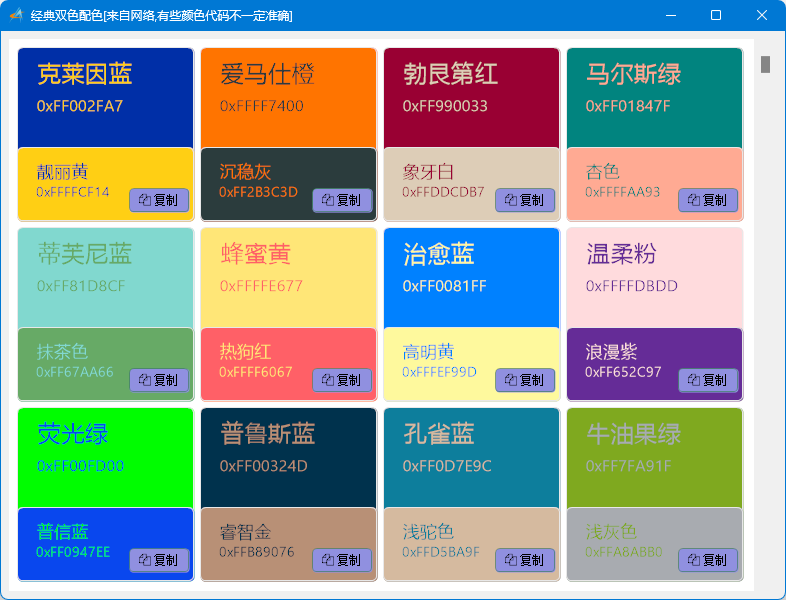
    import win.ui;
    import fonts.fontAwesome
    import godking.customPlus;
    import color;
    import win.clip;
    /*DSG{{*/
    var winform = win.form(text="经典双色配色[来自网络,有些颜色代码不一定准确]";right=783;bottom=567)
    winform.add(
    plus={cls="plus";left=8;top=8;right=752;bottom=560;bgcolor=0xC0DCC0;db=1;dl=1;dr=1;dt=1;notify=1;z=1};
    scrollbar={cls="scrollbar";left=752;top=8;right=776;bottom=560;db=1;dr=1;dt=1;edge=1;z=2}
    )
    /*}}*/
    
    import godking;
    
    import console
    var itemModel = {
        // 1. 主颜色
        {
            name="mainColorBg";
            type="rect";
            rectf={x=3; y=3; width=-3; height=-3}; 
            round=5;
            width=1;
            color=0xFFE8E8E8;
            fillcolor=0xFFFFF8EC;
        };
        // 2. 辅颜色
        {
            name="subColorBg";
            type="rect";
            rectf={x=3; y=103; width=-3; height=-3}; 
            round=5;
            width=1;
            color=0xFFE8E8E8;
            fillcolor=0xFFF8ECFF;
        };
        // 3. 主颜色名称
        {
            name="mainColorName";
            type="text";
            rectf={x=20; y=10; width=120; height=40};
            font={name='Tahoma'; h=22; color=0xFFFAFAFA};
            align=0; 
            valign=1; 
            smooth=true;
            text='\uF085';
        };
        // 4. 主颜色代码
        {
            name="mainColorCode";
            type="text";
            rectf={x=20; y=50; width=-8; height=24};
            font={name='Tahoma'; h=14; weight=600; color=0xFFCCCCCC};
            align=0; 
            valign=1; 
            smooth=true;
        };
        // 5. 辅颜色名称
        {
            name="subColorName";
            type="text";
            rectf={x=20; y=116; width=100; height=24};
            font={name='Tahoma'; h=14; color=0xFFFAFAFA};
            align=0; 
            valign=1; 
            smooth=true;
            text='\uF111';
        };
        // 6. 辅颜色代码
        {
            name="subColorCode";
            type="text";
            rectf={x=20; y=136; width=136; height=24};
            font={name='Tahoma'; h=12; color=0xFFCCCCCC};
            align=0; 
            valign=1; 
        };
        
        // 7. 复制按钮背景
        {
            name="btnCopyBg";
            type="rect";
            rectf={x=-68; y=-36; width=-8; height=24};
            round=4; 
            width=1;
            color=0xAA107C10; 
            fillcolor=0xFF9090E0;
            hoveredfillcolor=0xFF7C00FC;
            hover=true; 
            cursor=32649; 
            click=true;
        };
        // 8. 复制按钮文字
        {
            name="btnCopyText";
            type="text";
            rectf={x=-68; y=-36; width=-8; height=24};
            font={name='FontAwesome'; h=12; color=0xFF000000};
            align=1; 
            valign=1;
            text='\uF0C5 复制';
        };
    
     };
    var colors = {
    	{"#002FA7";"克莱因蓝";"#FFCF14";"靓丽黄"};
    	{"#FF7400";"爱马仕橙";"#2B3C3D";"沉稳灰"};
    	{"#990033";"勃艮第红";"#DDCDB7";"象牙白"};
    	{"#01847F";"马尔斯绿";"#FFAA93";"杏色"};
    	{"#81D8CF";"蒂芙尼蓝";"#67AA66";"抹茶色"};
    	{"#FFE677";"蜂蜜黄";"#FF6067";"热狗红"};
    	{"#0081FF";"治愈蓝";"#FEF99D";"高明黄"};
    	{"#FFDBDD";"温柔粉";"#652C97";"浪漫紫"};
    	{"#00FD00";"荧光绿";"#0947EE";"普信蓝"};
    	{"#00324D";"普鲁斯蓝";"#B89076";"睿智金"};
    	{"#0D7E9C";"孔雀蓝";"#D5BA9F";"浅驼色"};
    	{"#7FA91F";"牛油果绿";"#A8ABB0";"浅灰色"};
    	{"#185A56";"深灰绿";"#FD742D";"橘橙色"};
    	{"#9D73BD";"青紫色";"#7BA6D1";"飘蓝色"};
    	{"#66D3C0";"蒂芙尼蓝";"#FDDE83";"淡黄色"};
    	{"#2A4D6E";"深蓝灰";"#F7C45C";"活力浅黄"};
    	{"#FF6B6B";"珊瑚红";"#4ECDC4";"薄荷青"};
    	{"#3A405A";"深蓝紫";"#A8DADC";"浅天蓝"}
    };
    
    var itemLists={};
    for(i=1,#colors,1){
    	var cl = colors[i];
    	var tt = {mainColor=color.argbReverse(color.parse(cl[1]));mainColorName=cl[2];subColor=color.argbReverse(color.parse(cl[3]));subColorName=cl[4];};
    	table.push(itemLists,tt);
    }
    /*** 或用以下列表
    itemLists={
    	{mainColor=0xFF002FA7;mainColorName="克莱因蓝";subColor=0xFFFFCF14;subColorName="靓丽黄"};
    	{mainColor=0xFFFF7400;mainColorName="爱马仕橙";subColor=0xFF2B3C3D;subColorName="沉稳灰"};
    	{mainColor=0xFF990033;mainColorName="勃艮第红";subColor=0xFFDDCDB7;subColorName="象牙白"};
    	{mainColor=0xFF01847F;mainColorName="马尔斯绿";subColor=0xFFFFAA93;subColorName="杏色"};
    	{mainColor=0xFF81D8CF;mainColorName="蒂芙尼蓝";subColor=0xFF67AA66;subColorName="抹茶色"};
    	{mainColor=0xFFFFE677;mainColorName="蜂蜜黄";subColor=0xFFFF6067;subColorName="热狗红"};
    	{mainColor=0xFF0081FF;mainColorName="治愈蓝";subColor=0xFFFEF99D;subColorName="高明黄"};
    	{mainColor=0xFFFFDBDD;mainColorName="温柔粉";subColor=0xFF652C97;subColorName="浪漫紫"};
    	{mainColor=0xFF00FD00;mainColorName="荧光绿";subColor=0xFF0947EE;subColorName="普信蓝"};
    	{mainColor=0xFF00324D;mainColorName="普鲁斯蓝";subColor=0xFFB89076;subColorName="睿智金"};
    	{mainColor=0xFF0D7E9C;mainColorName="孔雀蓝";subColor=0xFFD5BA9F;subColorName="浅驼色"};
    	{mainColor=0xFF7FA91F;mainColorName="牛油果绿";subColor=0xFFA8ABB0;subColorName="浅灰色"};
    	{mainColor=0xFF185A56;mainColorName="深灰绿";subColor=0xFFFD742D;subColorName="橘橙色"};
    	{mainColor=0xFF9D73BD;mainColorName="青紫色";subColor=0xFF7BA6D1;subColorName="飘蓝色"};
    	{mainColor=0xFF66D3C0;mainColorName="蒂芙尼蓝";subColor=0xFFFDDE83;subColorName="淡黄色"};
    	{mainColor=0xFF2A4D6E;mainColorName="深蓝灰";subColor=0xFFF7C45C;subColorName="活力浅黄"};
    	{mainColor=0xFFFF6B6B;mainColorName="珊瑚红";subColor=0xFF4ECDC4;subColorName="薄荷青"};
    	{mainColor=0xFF3A405A;mainColorName="深蓝紫";subColor=0xFFA8DADC;subColorName="浅天蓝"}
    };
    ***/
    var p = godking.customPlus(winform.plus/*plus*/,itemModel,itemLists,{
            itemWidth=150,    /*项目宽度*/
            itemHeight=180,    /*项目高度*/
            autoSizeWidth=true,    /*自动根据项目列数及plus宽度调整项目宽度*/
            autoSizeHeight=false,    /*自动根据项目行数及plus高度调整项目高度*/
            colnum=0,     /*项目列数,为0则根据项目宽度和plus宽度自动计算*/
            rownum=0,     /*项目行数,为0则根据项目高度和plus高度自动计算*/
            padLeft=5,    /*plus左边空白距离*/
            padTop=5,    /*plus顶边空白距离*/
            padRight=5,    /*plus右边空白距离*/
            padBottom=5    /*plus底边空白距离*/
    })
    
    p.onClick = function(itemIndex/*项目索引*/,elemIndex/*元素索引*/,elemID/*元素id*/,elemName/*元素name*/,pageIndex/*当前页项目索引*/,x/*鼠标X坐标*/,y/*鼠标Y坐标*/,disabled/*项目是否禁用*/,itemRect/*项目区域*/,elemRect/*元素区域*/){
        /*鼠标左键单击非隐藏项目时触发该事件。当项目禁用或没有可点击元素时,默认不触发该事件。可设 allClickEvent=true 启用触发。*/
        if elemName=="btnCopyBg" {
            if p.itemList[itemIndex].btnCopyText=='\uF0C5 复制' {
                for(i=1,#itemList,1){
                	p.itemList[i].btnCopyText='\uF0C5 复制'; p.update(i);           
                }
                
                p.itemList[itemIndex].btnCopyText="已复制";
                win.clip.write("0x"++toHex(p.itemList[itemIndex].mainColor)++'\r\n'++"0x"++toHex(p.itemList[itemIndex].subColor));
            } else {
                p.itemList[itemIndex].btnCopyText='\uF0C5 复制';
                win.clip.write("");
            }   
            p.update(itemIndex);
        }
    }
    
    //预设红色字体
    var redFont = {name='Tahoma'; h=14; weight=600; color=0xFFFF0000};
    p.onDrawElement = function(itemIndex/*项目索引*/,elemIndex/*元素索引*/,elemName/*元素name*/,eleValue/*元素值*/){
    	
    	if elemName = "mainColorBg" {
    		var cl=p.itemList[itemIndex].mainColor;
    		return {fillcolor=cl;itemhoveredfillcolor=null};	
    	}
    	if elemName = "mainColorName" {
    		return {text=eleValue;font={name='Tahoma'; h=22; color=p.itemList[itemIndex].subColor}};	
    	}
    	if elemName = "mainColorCode" {
    		var clcd="0x"++toHex(p.itemList[itemIndex].mainColor);
    		return {text=clcd,font={name='Tahoma'; h=16; color=p.itemList[itemIndex].subColor}};	
    	}
    	if elemName = "subColorBg" {
    		var cl=p.itemList[itemIndex].subColor;
    		return {fillcolor=cl;itemhoveredfillcolor=null};	
    	}
    	if elemName = "subColorName" {
    		return {text=eleValue;font={name='Tahoma'; h=16; color=p.itemList[itemIndex].mainColor}};	
    	}
    	if elemName = "subColorCode" {
    		var clcd="0x"++toHex(p.itemList[itemIndex].subColor);
    		return {text=clcd,font={name='Tahoma'; h=14; color=p.itemList[itemIndex].mainColor}};	
    	}
    }
    
    
    p.bindScrollbar(winform.scrollbar);
    winform.show();
    win.loopMessage();


  • nanyi 15天前
    0 25
    近我者赤 import win.ui; import fonts.fontAwesome import godking.customPlus; imp ...
    这样的效果是不是用网页更合适?
  • 光庆 15天前
    0 26
    近我者赤 import win.ui; import fonts.fontAwesome import godking.customPlus; imp ...

    给你改了一下,另开一贴:https://aar.chengxu.online/thread-836.htm

  • 近我者赤 14天前
    0 27
    nanyi 这样的效果是不是用网页更合适?
    关键是对网页不熟悉啊
返回